Showing posts with label Tech stuff. Show all posts

Friday, May 14, 2021

Five things friday

1. BIKE TUNE-UP

I took my Scott SubCross 30 bicycle in for a tune-up yesterday. I bought it on June 5th of last year, and with the purchase of a new bike you get one free tune-up within the first year. There is a bike shop inside my place of employ (literally right across from my desk) and Emily is a fantastic mechanic. She adjusted the brakes, derailleurs, lubed the chain, checked cables, tightened spokes, and tried like the dickens to get rid of the squeal in my rear disc break. All for $0! Well, actually I gave her a $10 tip because she spent nearly 3 hours on it. The squeal is better, but she reminded me there is a 2-year warranty on the brakes, so if it doesn't clear up eventually I should maybe have them replaced. She also said to tell any other mechanics that it helps to sand the disc slightly.

2. AIRPOD PROS

I had told Jane I would get her some noise-cancelling headphones for Mother's Day - because she works by a sometimes loudly annoying coworker. First I ordered her some ~$50-ish earbuds online. I started to feel like maybe it was a scam though, so the next day I cancelled - and they actually gave my money back! Finally I decided to just splurge and get her the Airpod Pro earbuds. She is more than worth the $197 they cost, and hopefully this will help with her work situation - at least some. I do have to say, they are pretty nice.

3. VISIT WITH ISAAC

The boy was back in Indiana for a few days this week. One of his professors from undergrad passed away, and they asked him to help with the eulogy. They also said they wanted him to have his books and papers and whatnot. Isaac stayed in Indy and the funeral was south of there, so we met up in Anderson last night for a quick bite to eat. The Feipels also went. It was nice to see him, but I was the usual jerk. We ate at this little pizza place we used to love (Arts on Broadway). The pizza was still really good, but the service was a little lacking - as I'm sure it is at most places nowadays. I had ordered a second drink when our food arrived, and by the time I was done eating it still hadn't arrived, nor had the waitress been back. So not only was I annoyed, but I was mostly just REALLY thirsty. I tried not to make a total scene, but I'm sure I embarrassed everyone else. As usual.

4. WEDDING ANNIVERSARY #38

Today is our 38th wedding anniversary. In some ways it seems weird, but mostly it's not registering with me much this year. I should probably make a post just about this. Actually, I probably could have made a separate post about all these things. Anyway, I have the day off and Jane is taking a half day. We are planning to go out for lunch, then at 2 we get to see our granddaughter in a choral group. Tonight we actually work our first concert in over a year. I'll be curious to see how that goes.

5. OTHERWISE...

I really don't have much else to say. I've been in sort of a funk and not feeling the best for awhile. I'm still trying to run, but can barely make the first mile at a 12-minute pace before having to walk. The other day I finally did the third mile under 11 but that was it. It's not looking like it's going to be a stellar year. We'll see.

***

“For you created my inmost being; you knit me together in my mother’s womb. I praise you because I am fearfully and wonderfully made; your works are wonderful, I know that full well.” -Psalm 139:13-14 


Friday, April 16, 2021

New gps watch (ran 5+ miles)


The best thing about getting a new running watch: when you're done it congratulates you for your fastest mile, kilometer, 5k, and 10k! 

I wasn't real happy that my old watch crapped out the other day. I'd had it about 3 years. I thought about splurging and getting a nicer one, but I saw where I could get the same one as I had before (only in white) for $40. It's hard to beat a GPS watch for that price. So I ordered it and had it the next day.

I like these Timex Ironman watches - even in white - because they give me just the basic facts: time, distance, and pace. That's all I need to know. I don't care about my heart rate (which probably isn't going to be accurate anyway), or my steps, when I need to take a drink, how good I slept, etc. I just want it for running, and maybe biking. That's what this watch does. I finally figured out how to switch it from AVE PACE to just PACE on pp. 20-21 of the million-page instruction manual (you have to open PAGES on the watch and then change it). The watch doesn't have great reviews, mostly because of the clunky software required on a computer, but I haven't had too much trouble with mine. Forty bucks every couple years is doable. 

I wore the new watch for the first time today. It was also my best run in awhile. For some odd reason I felt really good when I got up this morning. I opened the Y and just worked 5-9, then around noon I took out on this beautiful sunshine-y 50 degree day. The first couple miles were a real struggle again, but I finally started to feel my legs on the third mile, and when I reached 4 miles I was feeling pretty good. I got faster with each mile, and the last one was finally under 10-minute pace. All told I ran 5 miles (53 minutes) and walked another 1.25 for 6.25 total. That's the most I've done in awhile.

Now it's time to mow the lawn for the first time this year. Watch out now!! ;)

***

Lamentations 4:17

"Yet our eyes failed,
Looking for help was useless;
In our watching we have watched
For a nation that could not save."


Wednesday, December 02, 2020

I got a new electric razor


I broke down and bought what I hope is a decent electric razor. It's a Braun Series 7 360° flex (7071cc). It was $150 in the store, but I got it on Black Friday weekend for $110. I hated buying something on Amazon (and giving Bezo's even more money), but it's $40... :(

I've had electric razors before, and also used the regular 'blade' type razor. I don't like to shave though. So I only do it every few days. Unfortunately, my facial hair comes in thicker than the hair on my head, and I should probably shave daily. I am hoping maybe a 'good' electric razor will help the situation (though I'm not overly optimistic).

What I really like about it is the SmartCare Center. It cleans, lubricates, and charges - just while sitting there in the stand. That has always been my problem with the cheapo electric razors I've had in the past - I just didn't take care of them very well. Plus you can use this one dry, wet, and even with shaving cream!

What I really HATE about this purchase before even using it... The instructions are PATHETIC!!! I mean, literally, the worst user's manual I have ever seen. Because there isn't one! There are some pictures, and they're not even good. It's like a cartoon guide. Makes absolutely no sense. 

UPDATE: Fortunately, I found this review which does a pretty thorough job of explaining how to use and care for this shaver. (https://shavercheck.com/reviews/braun-7071cc-review/)

Anyway, there is supposedly a 60-day money back guarantee, so I will give it a few weeks and see how it does. I'm also trying to find a user's manual elsewhere to help me try to figure it out. We'll see.

***

Deuteronomy 14:1-2

"You are the children of the Lord your God. Do not cut yourselves or shave the front of your heads for the dead, for you are a people holy to the Lord your God. Out of all the peoples on the face of the earth, the Lord has chosen you to be his treasured possession."

Tuesday, October 27, 2020

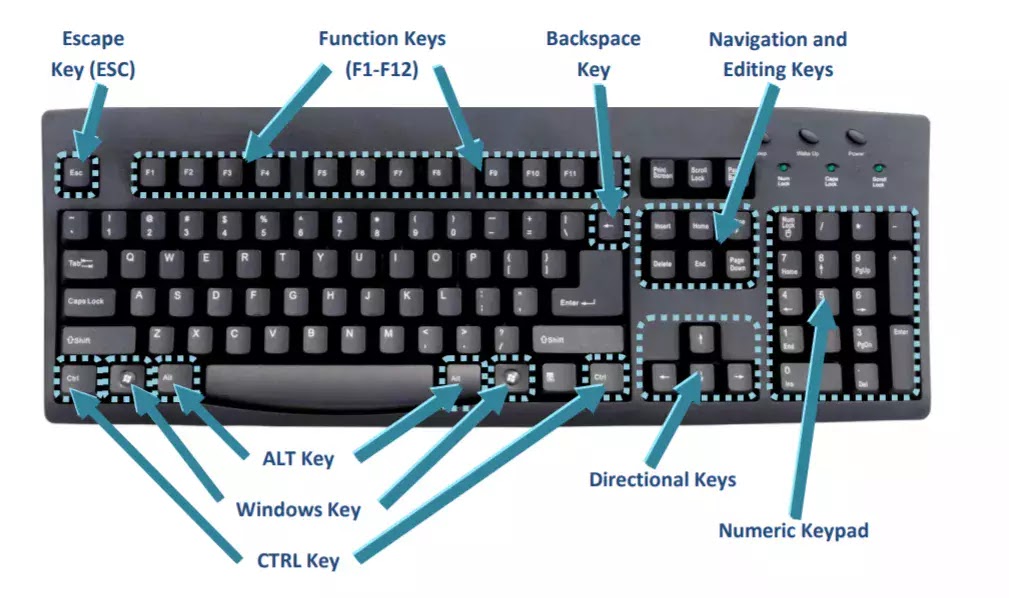
Keyboard shortcuts


Who doesn't want to do things faster, easier, and better?

I've probably posted this before, but I ran across this helpful little article by Whitson Gordon 'Do Everything Faster With These Keyboard Tricks.' There is much more to the article, but this was the meat I was looking for:

The Keyboard Shortcuts You Should Know

Let's start with the basics: learn as many keyboard shortcuts as your brain can store. You probably know a few (Ctrl+C to copy and Ctrl+V to paste, for example), but there are dozens of others that can replace the clicks you make all day long. Here are a few I can't live without:

  • The Windows key (or Command+Space on a Mac): If you need to launch a new app, don't go clicking through your Start menu or Applications folder. Just press the Windows key—or hit Commnand+Space on a Mac—and start typing the name of the app in question. When its icon appears, press Enter, and you'll have launched it without ever reaching for the mouse.
  • Ctrl+F: Ever search for something on Google, find a result that promises it has the phrase you're looking for, but you can't seem to find it in the 5,000-word article? Press Ctrl+F and you'll get a little search bar that helps you find any word or phrase on a page, instantly transporting you to the information you're seeking. (Bonus: you can then use Ctrl+G to scroll through the results.)
  • Ctrl+L: In a browser, press Ctrl+L and your cursor will automatically jump to the address bar, ready for you to type in a new search or web address. I probably use this underrated keystroke more often than any other shortcut on this list.
  • Ctrl+S: Save the document you're working on. Do this as often as possible, lest you lose everything when your computer crashes/loses power/your cat accidentally closes Microsoft Word.
  • Ctrl+T and Ctrl+Shift+T: Instead of clicking that tiny New Tab button in your browser, press Ctrl+T to instantly open a new tab and start searching. (Bonus: if you accidentally close a tab and want to bring it back, press Ctrl+Shift+T. Like Thor's hammer returning to his hand, the tab will reappear in an instant.)
  • Ctrl+Shift+V: Ctrl+Shift+V: You probably know you can press Ctrl+V to paste, but that often brings a lot of baggage with it—if you're copying text from a website, it could include the original font, links, and other formatting you don't want. To avoid this, many apps let you use Ctrl+Shift+V to paste a block of text without links and other garbage, so you don't have to waste time switching the font back to normal. Its behavior can vary a bit from app to app, but give it a try—on Mac you may find Command+Shift+V works in some apps, while Option+Shift+Command+V is required for others.
  • Ctrl+Arrow Keys: I used to have a boss who could work his way around a long document with nothing but the keyboard, and it amazed me. Turns out, he was holding Ctrl and using the arrow keys—left and right move the cursor between words, while up and down move it between paragraphs. (Bonus: if you hold Shift while moving the arrow keys, you'll select that text instead of just moving the cursor.)

 So... don't ever say I didn't tell ya somethin!

***

"Those who trust in themselves are fools, but those who walk in wisdom are kept safe." - Proverbs 28:26


Thursday, September 12, 2019

We bought a tv sound bar


Huzzah! We went out and bought ourselves a TV Sound Bar!!!

Our favorite TV channel lately has been GritTV. It plays old westerns. However, it seems the volume is always lower on this particular channel, so we're always having to crank it way up.

I don't know what gave me the idea the other day, but I suggested to the missus that we look into a sound bar for the TV (the one in the basement). I did a little bit of research, and it seemed the Vizio SB3621n-E8 was the best one for under $200.

They had reconditioned ones advertised for $99, but none were in stock. So, I decided to just hop over to the nearest Walmart yesterday and grab a new one for $148.

I got it hooked up in... not too much time... and it is marvelous, darlings!

Now we can watch movies, and sporting events, and LISTEN TO MUSIC, and there is actually bass (thanks to the super sub-woofer)!

Once I got it connected I sat downstairs for a good bit and just listened to music. I had it on the Bob Dylan channel on Pandora. It was sweet. :)

It does feel a little like an unnecessary extravagance, but at least it's something we will use... and appreciate.

Monday, May 27, 2019

I got a new phone (iphone 8)


I finally broke down and replaced my old iPhone 5s. It still worked okay, but with only 16 gig of memory, it just wasn't able to keep up. Every time I tried to add an app I would first have to offload a couple others. I hadn't actually been able to use the Uber app for a long time because it took up too much space.

So... I bought an iPhone 8 in space gray (it looks black to me). There is a pretty good article here that explains just about anything and everything I need to know about it. It's almost identical looking to Jane's iPhone 7, but it is much bigger and heavier than my old 5s.

Apparently I bought the 5s in September of 2017, so I got almost 5 years out of it.

We bought this phone at Best Buy (which I would recommend to anyone buying a phone). They don't work on commission, and he actually took like $20 off our bill by point out needless things we were paying for that we weren't even aware of! I actually got this iPhone 8 for $5 cheaper than if I'd bought it online from Verizon. It is just under $21/month.

I briefly considered the iPhone Xr, which would have been roughly $27/month. That may have been the smarter buy, but in the end I thought I would save some money and just didn't see that the few additional features on the Xr - or the 8 Plus - worth the extra cost.

So far I guess I'm happy enough with this phone. I was glad it came with a pair of wireless Apple ear buds. I'm not thrilled about how much bigger - and especially heavier - it is. I suppose I will get used to it though.

I found a basic case for $14.99 at the grocery store, so... I guess I'm good to go. Yay me!

Tuesday, April 30, 2019

Responsibility without authority, and learning excel

Just dropping a couple things off today for later perusal. Sorry, I've been busier than I want to be. Nothing lasts forever... (we're not in Kansas anymore, Toto)...

I keep thinking about this - "responsibility without authority" thing - and I need a reminder. So here are just a couple things I gleaned from a quick search:

I can use Excel, but I've always wanted to get a better understanding of it. Now I feel it would be advantageous for several reasons. So here are a couple places online:

Otherwise... we celebrated the youngest grandson's 5th birthday yesterday; the parking lot drama continues (the biggest problem is dealing with the people trying to tell me how to do it); work is just stupid; and... meh... there's more, but it's not worth it.

Gotta go!

Saturday, December 08, 2018

Re-configuring my phone


I was directed to this great article "How to Configure Your iPhone to Work For You, Not Against You" by Tim Ferriss. So, this is what I changed the front of my phone to look like.

I didn't follow all the advice in the article, but I moved a ton of apps to other pages, and buried my social media and whatnot in second-tier spots. In just one day I think it has helped keep me from looking at my phone so much.

These are the things I need the most: texts, my work time clock, email, calendar, clock (alarm), phone, and camera. The things I used to spend a lot of time looking at - and getting distracted by - were Facebook, Instagram, my blog, and the Fighting Illini forum. It's now more difficult to get to them, so I tend to not go there as often. Which I like.

So, that happened. I may tinker some more, and re-read the above article again too. Until then, if you get ahold of my phone, this is what it will look like.

Saturday, July 14, 2018

New gps watch / runners on parade / 14 miles


Throwing several things together today. For starters I finally got a new GPS running watch.

My old one - the brand shall remain nameless because Nike totally SUCKED in how they handled it - still worked fine, but said company decided to no longer support their expensive running watches. Once the memory was full, that was it.

I did a lot of research on running watches the past few weeks, and despite a lot of negative reviews, I finally opted for the Timex Ironman GPS. Several reputable sources selected it as the 'best GPS watch under $100.'  The things I liked best though, were (1) It was on sale for only $74 online, and (2) It is THE MOST BASIC GPS WATCH THAT HAS EVERYTHING I WANT/NEED.

All I use in a watch is distance, pace, and time. And that's ALL this watch does! I think I may have finally figured out how to change "average pace" to "actual pace" today so we will see. So far it has worked pretty well.

RUNNERS ON PARADE
Jane and I ran another 5k this morning. During Fort Wayne's Three Rivers Festival they have a race called "Runners On Parade." The reason for the name is because it's a 5k that follows the festival parade route (not that the parade is a 5k).

It's a nice race, and we've participated before. It's one of the few "money" races I know of in Fort Wayne. Not that we would ever win any money - there were quite a few runners for this event - but it is fun running along the parade route and having a crowd of people cheering for us.

I'd guess we finished in right around 30 minutes. We were averaging just under 10-minute miles. Daughter Carrie was nice enough to snap this pic of us.


FOURTEEN MILES
The 5k was only a part of my running today. I was scheduled to do 14 miles, and it worked out just about right that if I ran from our house to the start of the race, ran the race, and then ran home again, it was almost exactly 14 miles. So that's what I did.

I left home at 6:30 am, and actually ran that 5 miles faster than I planned into the downtown area. I averaged right about 10-minute miles. I met Jane at the Central Y, ate a gel, changed my shirt, and we headed for the race site. We had about a half hour wait until the 5k started, and walked a little over 1/2 mile to get there (giving me the 5.5 miles I needed).

At some point I messed up pausing my watch, but I was also using the running app on my phone. Unfortunately, I messed that up at some point too, so I'm thinking I may have finished with a half mile more than fourteen. Oh well.

After the race, we talked to Carrie, then parted ways. Jane went to the farmers market, and I took off running again (after another gel and shirt change at the Y). I took a slightly different route home which allowed me to get a drink at Foster Park, but it also added that 1/2 mile. At any rate, I pretty much died at 13.25 miles (or what I think was actually 13.75), so I walked the rest of the way home.

Once home I threw my legs up the wall for awhile, re-hydrated, and then soaked in the tub. As I was getting out of the tub I slipped on the mat and fell kind of hard on the edge of the tub. I'm hoping I just bruised my ribs, but it hurt like heck.

So, from a new watch to sore ribs. All in a Saturday's run...

Wednesday, November 01, 2017

New printer - hp officejet 4655


I finally broke down and bought a new printer for the computer yesterday. Our old one was possessed or something and never did work very well. It wouldn't turn on when you wanted it to, or off when you wanted it to, and it was just about as uncooperative as a printer can be. So it was with no remorse that I tossed it into the garbage.

I went to Costco and bought the HP Officejet 4655 all-in-one for $65. Of course a 2-pack of ink cost the same amount. At least it works.

This is our first wireless printer and it seems to be pretty nice. We can print from the laptop or our phones (after downloading the app). It prints rather slow, and only holds 100 sheets of paper at a time, but for no more than we use a printer that is good enough. The next cheapest one was $95.

So, there's that...

Saturday, September 03, 2016

The juno webmail scam


So, back on June 30th of this year I wrote about how I'd finally decided to cancel the old Juno webmail account I had when pastoring. Well, apparently I only thought I'd cancelled it. It appears that Juno isn't that easy to get rid of.

When I originally called to cancel I thought it was weird that I started getting "welcome to Juno" things, and I actually got a Juno cd in the mail. It would appear that instead of cancelling, they re-signed me up or something! It was hard to know because the person I talked to didn't speak English very well.

So...... the other day (9/1/16) I called back - after finally finding on their site how to go about deactivating - and once again got someone who spoke very poor English. I tried to explain that I wanted to deactivate/cancel my account and she tried signing me up for a different plan. I finally had to get a little stern and explain that I didn't want any of it! I wanted to be done with them, and I wanted my credit card info taken out of their system! She finally seemed to understand and said to do that I simply needed to stop using the account for 60-90 days. I asked how I could get my credit card info removed and she said that wasn't possible, that I just needed to leave the account dormant for 60-90 days.

I don't have a good feeling about this, but I guess I'm going to have to leave it dormant and watch my cc statements to make sure they don't automatically extend my subscription. Or, maybe it would be easier to just go ahead and get a new card.

So, what I have I learned? DON'T USE JUNO FOR WEBMAIL/EMAIL/INTERNET SERVICES. Which is unfortunate because we still have our very first email account with them under a different account. It sounds like we may have it forever.

Tuesday, March 15, 2016

New tv

 
We bought a new television for the basement living room this past Sunday. Our old one had been given to us by a friend and it finally crashed. It was one of the old style sets that is deeper than it is wide, and it's pretty big and H.E.A.V.Y. Someday we'll figure out how to get it out of the basement. In the meantime, we are happy with our new purchase.

We went to Best Buy just to look. We were thinking new tv's were like $600 or something. Well, we ended up getting one on the spot. We bought a 48" Insignia HDTV with built in Roku. We were going to get the regular one for $319, but when we saw the one with the Roku for only $30 more, we thought we could use the Roku machine we have on the little tv upstairs.

We brought it home and had it together in no time. Since it has the built in Roku, and it was a new tv, we could get rid of the old Roku and the converter box we'd been using. So that means we now only have ONE remote control!!! How cool is that? The only wires are the AC plug, the dvd player, and where the rabbit ears plug in. Plus it is really, really light.

Set-up was a breeze. The instructions were pretty basic. We just plugged it in, punched in our wireless info, our Roku and Amazon accounts, set it up for antenna tv, and we were in business.

It is actually probably too big for us. We would have been fine with a 36-40". But we've never really had a nice big tv before, so we were pretty excited. It's almost like we're at the movies! It's also really nice having the built in Roku. I usually opt against built in things - because it's easier to fix/replace elements instead of entire pieces - but I didn't think we could pass it up for a mere $30 more.

So, we are pretty happy tv watchers now. Not that we watch it much, but hopefully I can catch a few NCAA basketball tournament games (if they're on network tv). We are currently catching up on the tv show 'Justified' and about ready to start into the recently-free season 6.

The actual TV in our basement.

Thursday, March 10, 2016

Internet fix


Our internet went out Tuesday. I was doing my usual morning routine of reading the news and whatnot, and all of a sudden new pages would not open. I followed protocol on the computer, and then reset the router, checked everything else I could think of... and it just wouldn't work. The "internet" light on the router was amber.

Poor Jane had the misfortune of having to call Frontier and spent TWO HOURS on the phone with two different people trying to get it resolved. After repeating herself several times and struggling to understand the customer service reps, they finally told her they would have to send a repairman to our house the next day - sometime between 8 am and 5 pm.

Fortunately Jane was home, and the repairman actually came fairly in the morning. I guess he was quite baffled, and apparently it wasn't just our house but several people in our area were without. He finally got it working, and he and Jane discovered that he was actually a neighbor of Drew Carrie (Baxter) - our grandkids play with his kids all the time. Small world.

So, that was our internet issue. We actually survived a day and a night without it. I do have to say, even though I've heard horror stories from people regarding almost all internet providers, we've always been pretty fortunate with ours (so far).

Saturday, January 23, 2016

Updated to windows 10


I finally took the plunge the other day and updated our home computer to Windows 10. After getting the free update notifications for however long now I guess maybe I was just tired of looking at them.

I can't really say if it's better or worse than 8.1. It has a slightly different appearance - which I suppose I could possibly change if I wanted to. Otherwise I don't know if it was a good idea or bad. I guess I basically just use this computer for getting online. So... that's all there is to say about it at this point.

Saturday, May 02, 2015

My phone fix

I had been having trouble with my iphone 5 lately. One thing was the charger. When I would plug it in to charge it would occasionally not charge. Then I noticed that if I held it in a certain way it would, but as soon as I would let go, it would stop. So I did a Google search and found a very simple solution.

If you are having trouble with your phone not charging, try cleaning out the port in the bottom of the phone. I suggest a toothpick. I had tried just blowing, and some people suggest compressed air, but when I started digging out the lint I realized there was just too much packed in there. It was like a belly button full. It works great now.

The other issue we had was... Jane and I both have the same phone, and we share and Apple ID. When we upgraded to IOS 8.3 the other day, all of a sudden we started getting each other's text messages (iMessages). There were also some other issues. So, again, I did a couple day's worth of Google searches and was finally able to figure out how to set up my own Apple ID. We kept the same ID for our phones, and for pictures and iTunes, but I used my own for messaging and facetime. That seemed to take care of that.

So, there ya go, two fixes for the stupid iPhone. After having so much trouble finding actual details that were for OUR particular phones with our particular operating system, I can't believe these phones are as popular as they are. They are not very user friendly. But, nonetheless, we have them.

Friday, January 16, 2015

A new mouse, and 213,000 miles

We had to buy a new wireless mouse for the laptop at home. I guess I wrote on Facebook about the cat knocking a cup of coffee over on the computer a week or two ago. So far the Lenovo has faired pretty well. It was drenched with an entire cup of coffee. I just turned it on its side and let it all drain off. Apparently the mouse couldn't take it though. We have a wireless Logitech keyboard and mouse - and I'm not sure I could use a laptop regularly without them (at least the mouse) - so we just forked over $25 for another Logitech mouse last night. They keyboard is not as necessary - I don't use one on my computer at the office - but I do like one with the computer at home. The home laptop seems to be much more sensitive to hands and arms and whatnot.

In other news... the Buick turned over 213,000 miles this morning. We had a meeting at the Downtown facility, and it hit the mark just as I pulled into the parking lot. Then I forgot to tell anyone about it. It was also a bit odd because usually the odometer doesn't light up, and you can't see how many miles are on it (or what gear it's in), but it was lit up this morning. So there ya go!

Wednesday, December 10, 2014

I'm not sure what happened there

I have no idea what's going on with my blog. Last night I tried to look at it, and it kept redirecting to some kind of "advert." This was the link it redirected to: http://x.vindicosuite.com/imp/?l=169943&t=h&u=&r=&rnd=28910722 (if that means anything to anyone). I couldn't sign in or anything. So I changed my google password and just went to bed. Now, this morning, it seems back to normal. But who knows.

I have noticed the past few weeks that I've had a "Googlebot" going through my archives to old posts. So I suppose it's something Google did to sabotage one of their own blogs (I believe Google owns Blogger).

I did hear from a friend from Missouri last night about it. For all I know Jim may have fixed it. If so, thanks Jim! :)

Other than that... I was totally prepared to lose my blog last night. Sure, there are lots of memories and things here, but nothing really important. It would be like a house fire, I suppose. Sometimes I do think this is kind of pointless though, and a big waste of time. But I guess it's a classic - 'it is what it is.' So... whatever.

Friday, September 26, 2014

I got a new phone...

Egads. I broke down and got a stinkin' iphone yesterday. I think half the reason they call these things "smart" phones is because they make people like me feel so stupid. I was proud of myself that I actually figured out how to MAKE a phone call (while still in the store parking lot), but I can't say that I know how to RECEIVE a call yet. So don't call me. I can do text.

Anyway, they didn't sucker me into getting an iphone 6, but they did sway me towards the 5S. Actually, several people did. Fortunately it still has iOS7 instead of 8. That's the last thing I need is a too-smart phone that doesn't work.

I was leaning heavily towards a Samsung Galaxy - just because I didn't want the stigma of owning an iPhone - but I don't like the large phones. I need something that fits into my pocket. I also thought of just getting a flip phone again, but.... you know.... these smart phones are kinda nice. Once you figure out how to use them.

So I will be spending much of today trying to figure things out and set things up. I envision myself sending out mass text messages and filling Facebook up with location notifications and whatnot. I suppose I should steer clear of strip clubs and crack houses for a few days.

I do need to make a trip back to the Verizon store to get my free tablet though. With the purchase of my phone I get a FREE tablet (don't even know what kind). I didn't take it yesterday because I wasn't going to be persuaded into any of those "extras" they try to stack on. I was chided for not taking the tablet when I got home. After I got home I went to Walmart and got an $8 case and $3 screen cover. I might have went without the case, but I suppose they make them slippery for a reason (so you have to buy a case). Whatever.

That's about it. Actually, that's enough for me for one day.

Thursday, July 31, 2014

Windows 8.1 at home, new computer at work

Yesterday I downloaded the free version of Windows 8.1 on our home computer (laptop). We were one of the unlucky few who purchased a computer with Windows 8 on it. I've learned to deal with it, but still hate it when I think about it. I guess they're already phasing it out, so I figured I better get 8.1 while I could. It doesn't seem to have made much of a difference at all.

I got a new computer at work this past Monday. We'd been running Windows XP there, and the new one came with Windows 7 on it. The IT guy made the switch during working hours, and it wasn't exactly a fun day. At least it works better. Instead of sitting on the floor, it's about the size of a Kraft Mac'n'cheese box and just sits perched on the bar connecting my two monitors. I'm still learning the nuances of switching from Outlook Express to just plain Outlook, but so far I like it better. I no longer have to check mail on the server side and our own, and it works quite a bit faster. It used to take about 20-25 minutes to close day, now it takes less than 10. It is basically just like the computer at the Downtown location now. So, that seems to have turned out well.

Otherwise, I need to remind myself about the post I was writing in my head last night dealing with: APE Rape.

Thursday, February 21, 2013

On the roof

Not at all similar to 'On the Road'... but I spent a couple hours in the freezing cold up on the roof of the church yesterday. It was really windy Tuesday (50 mph winds) and it blew our internet antenna/receiver over. It was like that when I got to the office in the morning. We have a receiver that picks up a line-of-site signal from Yoder, so it kind of needs to be upright to work right. So my internet was crap on Tuesday. I called our service provider and they said they would send someone out to fix it. Well, when I got to the office on Wednesday it was still bent over. They left a message on the office phone and said they could maybe get to it on Thursday. So... I got the ladder out, and even though it was still pretty windy, and it was 15 degrees f outside, I climbed up and assessed the situation. Two bolts were holding, but the other two had been ripped out of the roof. So I got my socket set out of the car and proceeded to try to re-tighten the bolts. One was completely stripped, but I thought I got the other one tightened down. So I came inside and called and told them I fixed it myself and they didn't need to come. I then went to town and got a couple of bigger bolts and figured that would work. Well... when I got back it was blown over again, and the bigger bolts didn't help much either. So I called them back and asked if they could still come on Thursday. So now I'm waiting for them to show up and fix it right (hopefully).

The problem is, we've only had this antenna on the roof for a month or two. They just upgraded it and replaced it. So that means it didn't last very long before the wind demolished it. I think they need to find a better way to secure it than four 2" bolts drilled into the roof. Or... what I would LIKE to do is... just get one of those Verizon Hot Spot things for internet. It wouldn't cost all that much more, and our internet service isn't very good with what we have. But we'll see. I'm just glad I don't have to go back up on the roof today (hopefully).